E-learning tool
PowerPoint add-in
Publishes a PowerPoint presentation as a lesson for Moodle, without leaving PowerPoint.
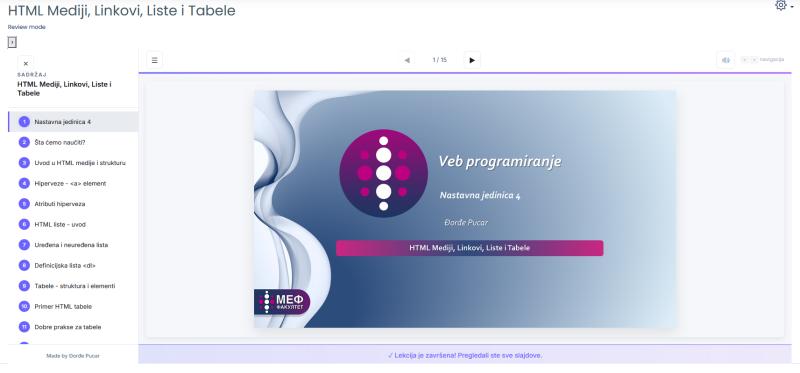
Screenshot · A lesson from my Web Programming course at MEF
- Contents: one entry per slide, taken from the slide titles.
- Slide counter and arrows.
- The slide itself, rebuilt as a web page that keeps the original layout.
- When every slide has been seen, the lesson says so and reports it to Moodle.
The situation
Courses at MEF run on Moodle, and a lot of teaching material starts as PowerPoint. Moodle can store a .pptx file, but it can’t play it as a lesson or tell whether a student actually went through the slides. For that, the lesson has to be a SCORM package.
The tools for turning presentations into SCORM packages were clunky, and course authors struggled with them.
SCORM A standard format for online lessons. A SCORM package is a zip file that learning platforms like Moodle can open, play and track.
What I built
An add-in that puts publishing inside PowerPoint. You finish the presentation, publish it from PowerPoint, and get a SCORM package that keeps the slides’ layout and typography.
The package includes a small lesson player: a table of contents made from the slide titles, arrows and a slide counter, and a message once the learner has seen every slide. Moodle records the lesson as completed.
How it works
From a presentation to a lesson Moodle can track:
- presentation.pptx Your slides, as usual.
- Publish The add-in reads each slide from PowerPoint.
- lesson.zip A SCORM package, with the slides rebuilt as web pages.
- Moodle Upload it as a SCORM activity.
- Done Moodle knows who finished the lesson.
Diagram
My part
I wrote the add-in in C# and the lesson player in HTML, CSS and JavaScript.
The result
Publishing happens inside PowerPoint, and the lesson looks like the presentation it came from. I’ve used it for my own lessons, like the one in the screenshot.
Technical details
For developers: the stack and how the pieces fit together.
- Language
- C#
- Add-in type
- VSTO (Visual Studio Tools for Office), for PowerPoint on Windows
- Reading slides
- Through PowerPoint’s object model, slide by slide
- Output
- SCORM 1.2 package with an HTML5 player; each slide rebuilt as HTML
- Tracking
- Progress and completion reported through the SCORM 1.2 runtime API