Equipment inventory
MEF Inventar
Every computer at the faculty: what’s inside it, which room it’s in, and whether it works.
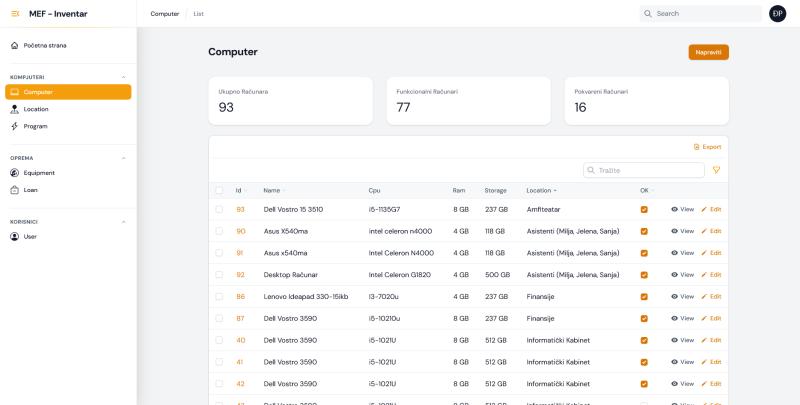
Screenshot · The computer list
- Totals at the top: all computers, the working ones and the broken ones.
- One row per computer: model, processor, memory and storage.
- Where it is: a room, or the people it’s with.
- Works or not, at a glance.
- Export the list when someone needs it as a file.
- Separate lists for computers, rooms, programs, equipment, loans and users.
The situation
A faculty has equipment everywhere: computers in the amphitheater, laptops with the teaching assistants, desktops in the finance office, a whole room of machines for IT classes.
Keeping track of all of it by hand led to mistakes, and every audit was slow.
What I built
MEF Inventar keeps one record per item. For a computer, that means the model, processor, memory, storage, the room it’s in, and whether it works.
Every item gets a QR code. Scanning it opens the item’s record, so checking a machine starts with pointing a phone at a sticker instead of searching through lists.
Separate lists cover rooms, installed programs, other equipment and loans, so the faculty can see what software is on which machine and who has borrowed what.
QR code The square barcode a phone camera can read. Here it holds the address of the item’s record.
How it works
One label, one record. The overview answers the first questions anyone asks about equipment: how many, which ones, where, and do they work.

The record it opens
- Item
- Dell Vostro 15 3510
- Processor
- i5-1135G7
- Memory
- 8 GB
- Storage
- 237 GB
- Room
- Amfiteatar
- Works
- Yes
The values are from the first row of the real screenshot.
My part
I worked out what the inventory needed to record, designed the data structure and built the app, including the QR codes and the overview screens.
The result
Everyone who looks after equipment works from the same list: what exists, where it is, what’s broken and who has it. The day the screenshot was taken, that list held 93 computers, 16 of them marked as broken.
Stock checks got faster: you walk through the rooms with a phone and scan.
Technical details
For developers: the stack and how the pieces fit together.
- Framework
- Laravel (PHP), with Filament 3 for the admin panels
- Database
- MySQL
- QR codes
- Generated in the app; each one points to the item’s record
- Screens
- Tables with search, filters and export; summary counts of working and broken computers
- Data
- Separate resources for computers, locations, programs, equipment, loans and users
- Sign-in
- Email and password