Srpski

I build software that keeps track of things.

Research papers, computers, conference submissions, lessons for Moodle. I’m Đorđe Pucar, a developer in Belgrade, and since 2021 I’ve been building the tools that MEF, a faculty here, uses to keep all of that in order.

If your team keeps track of something with spreadsheets, email and someone’s memory, I’d like to hear about it.

See the work Write to me

Đorđe Pucar

Works as
Freelance full-stack developer
Based in
Zemun, Belgrade
Builds
Record systems, inventories, submission platforms, e-learning tools, websites
Languages
Serbian, English, French

Things I’ve built

Three of these are running at MEF right now. The other two are tools for turning presentations into Moodle lessons. Below them is earlier work I no longer maintain.

Research records

nir.mef.edu.rs

NIR

Every paper the faculty’s researchers publish, entered once and filed properly.

Researchers sign in with their faculty account and add their papers, step by step or straight from a DOI. From there, the records fill the faculty’s public repository and are shared with the Ministry’s systems.

How NIR works

1,974

papers in the public repository, the oldest from 1997

Counted in October 2026

NIR’s public repository, “Research by MEF faculty”: a search box for title, author, DOI or ISBN, a count of 1,974 papers by 43 authors, 616 with full text, and the newest papers listed below.

Equipment inventory

MEF Inventar

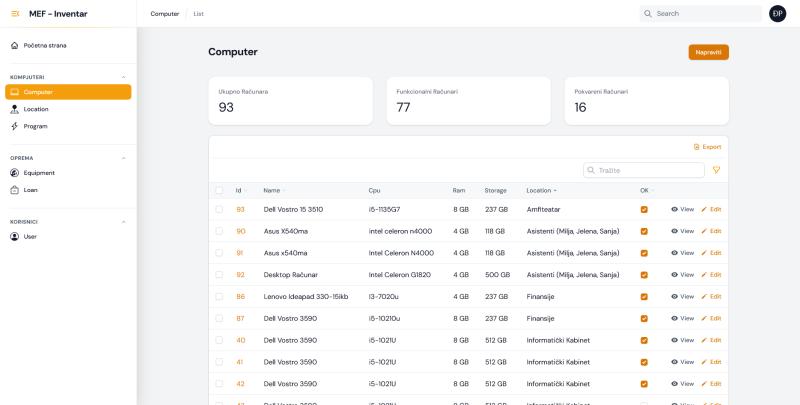
Every computer at the faculty: what’s inside it, which room it’s in, and whether it works.

Every item gets a record and a QR label. There are also lists of installed programs and of loans, so it’s clear what runs where and who has borrowed what.

computers
93
working
77
broken
16

From the screenshot, on the day it was taken

MEF Inventar’s computer list: 93 computers in total, 77 working and 16 broken, above a table of computers with model, processor, memory, storage, room and a “works” checkbox.

Conference paper submissions

MEFkon submissions

Papers for the faculty’s yearly conference, from the first upload to the proceedings.

Authors register, upload their paper and can see where it stands. The organizers see every submission and its status in one place.

The MEFkon 2025 conference website: “Economy, IT & Management”, with links for authors, the program, login and registration.
  1. Register
  2. Submit
  3. Review
  4. Decision
  5. Proceedings

E-learning tools

Two ways to turn a presentation into a Moodle lesson

Moodle can store a PowerPoint file, but it can’t play it as a lesson or tell whether someone actually went through the slides. For that it needs a SCORM package: a zip with the slides, a small player and a file that describes what’s inside. I built two tools that make one.

E-learning tool

PowerPoint add-in

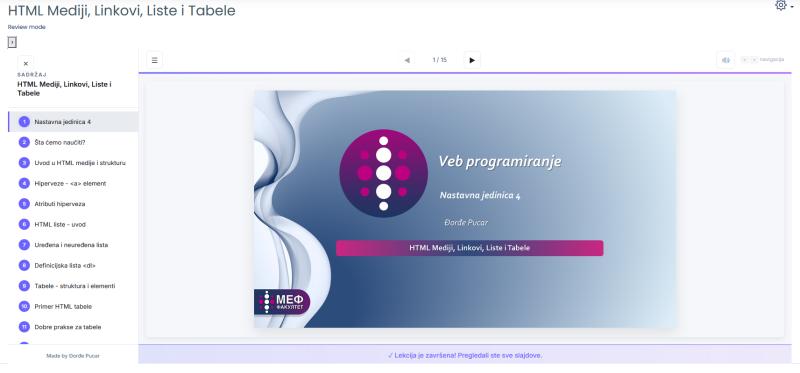
Publishes the open presentation as a SCORM package, straight from PowerPoint. The lesson in the picture is one of mine, from the Web Programming course.

A lesson in the player the add-in creates: a table of contents on the left, slide 1 of 15 from the Web Programming course in the middle, and a message at the bottom saying the lesson is complete.
How the add-in works

E-learning tool, online

PPTX2SCORM

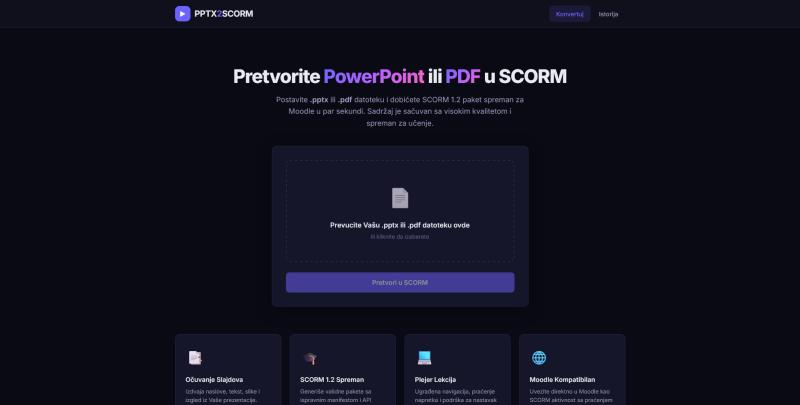
The same idea as a web page: upload a .pptx or .pdf, download a package for Moodle. Nothing to install.

PPTX2SCORM’s page, in Serbian: a box to drop a .pptx or .pdf file, a “Convert to SCORM” button, and four short feature descriptions.
How PPTX2SCORM works

Earlier work

Projects I built in the first place but no longer work on.

Journal website

JPMNT

The website of the Journal of Process Management and New Technologies, which MEF publishes.

Everything about the journal in one place: aims and scope, instructions for authors, the editorial team, and an archive where every issue has its own page with the papers, their DOIs and PDFs. I built it in WordPress so the journal’s staff could publish new issues and edit pages themselves, without a developer.

My part
Built the original site. I no longer work on it.
Built with
WordPress
japmnt.com
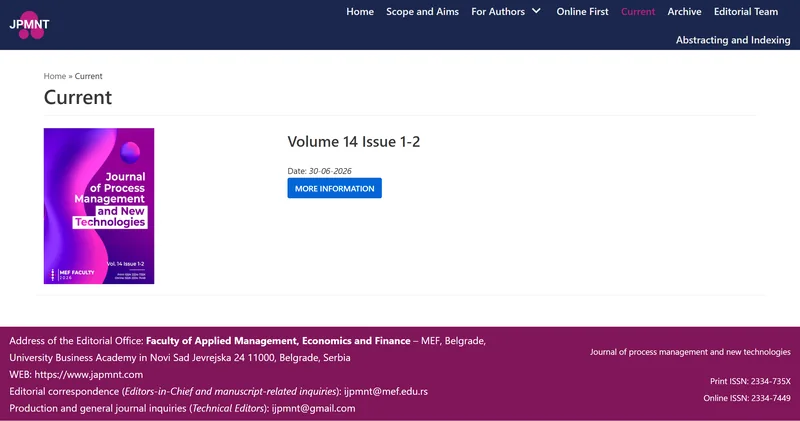
The JPMNT website’s Current page: the cover of Volume 14, Issue 1-2, dated 30 June 2026, under a dark blue menu with Scope and Aims, For Authors, Online First, Archive and Editorial Team.
Screenshot · The site in October 2026

What I can help with

Mostly the same kinds of problems as the projects above. If yours looks similar, there’s a good chance I can help.

How working with me goes

You talk directly to the person who will write the code.

  1. We look at how it works now

    We go through your current process, your data, and the parts that slow you down.

  2. I write down what the tool should do

    Before any code: the screens, the information it keeps, and what’s out of scope. You know what you’re getting.

  3. I build it in working pieces

    The core first, then extras like automation and reports. You can try each piece as soon as it’s done.

  4. We adjust it once people use it

    Everyday use shows what needs changing. I adjust it to how your team actually works with it.

Đorđe Pucar, arms crossed, in a black cardigan with white line drawings.

About me

I’m Đorđe Pucar. I studied information technology at MEF in Belgrade (bachelor’s in 2020, master’s in 2021) and went on to PhD studies in electrical engineering and computer science at FIMEK.

At MEF I started as a student demonstrator and became a teaching assistant. I teach Web Programming there, and in earlier years I also taught E-Business and Quantitative Methods.

My bachelor’s thesis was about building a researcher’s record card, a karton, in CodeIgniter. Later I built NIR, which the faculty calls MEF – Karton. Most of what I’ve made since follows the same idea: information that was scattered gets one proper place.

I work in Serbian and English, and I also speak French.

What are you keeping track of?

Tell me how it’s done today and what’s annoying about it. I’ll reply within a day or two and tell you honestly whether I can help.

Write to me or find me on LinkedIn